Claude Code Cheat Sheet
STORYFOX.CZ
This is a fantastic cheat sheet that highlights the various slash commands, keyboard shortcuts, skills, agents and a configuration settings for Claude Code.
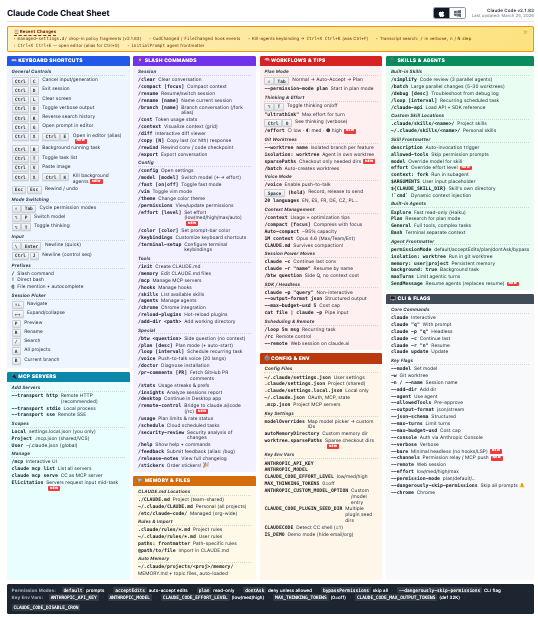
One of the first things I realised when looking at this cheat sheet is that my Claude Code was at version 2.0.44 ( a few months old), so lacked a number of the more interesting looking commands. I somewhat naively assumed it was an evergreen app. I’ve run claude update, and am now up-to-date.
This cheat sheet has highlighted all sorts of interesting features that I was unaware of, and will definitely try. For example, I didn’t know you could run it in a loop. It’s also useful to have a quick reference on things like configuration file locations and environment variables.
A fun one worth trying is /insights, which creates a personalised dashboard of your overall usage. It provides an overview of what you use Claude Code for:
“You use Claude Code primarily as a research and automation assistant rather than a traditional coding tool. “
Which is fun, but a more useful aspect of this report is that it details areas where your session show signs of struggle, for example:
“Claude frequently ignores your predefined skills and instead tries to manually explore codebases or skip documented steps, forcing you to interrupt and redirect. Consider referencing the skill explicitly in your prompt or adding stronger guardrails in skill files to prevent Claude from freelancing.”
Very useful.
Claude’s Code
CLAUDESCODE.DEV
Last week I covered some of the more negative impacts AI is having on open source. However, one thing I haven’t seen is much information about the overall quantity of AI-generated activity on GitHub. We all know it is going up, but by how much?
This site provides a dashboard specifically for Claude Code, indicating that it has made 20 million commits since it was first released.
As the author indicates:
“The data is noisy, the detection is imperfect, and a commit trailer tells you Claude was involved — not how, or how much, or whether it mattered.”
Despite this caveat, it is a really interesting dashboard, and the growth (at least for now) is exponential.
Updates to GitHub Copilot interaction data usage policy
GITHUB.BLOG
In simple terms, the overall “power” of a Large Language Model depends on the size of its training dataset. The more (quality) data you can provide it with, the better it becomes. So what do you do if you’ve training a model on all of the code you can acquire via GitHub? You need to find new datasets to harvest. Now that GitHub Copilot is being used by millions of developers, these interactions can be used to improve model performance. Sounds great? We all get better models, right?
This blog post informs GitHub Copilot users that from April 24th, their interaction data will be used for model training unless they opt out.
The overwhelming community sentiment towards this change is quite negative. While paying customers are opted out, everyone else is now being opted in, at short notice without their consent. You can update your settings to prevent GitHub training on your data, but the setting itself is somewhat misleading:
- Enabled = You will have access to the feature
- Disabled = You won’t have access to the feature
Is GitHub training on your data really a ‘feature’? This is something of a dark UI pattern.
Furthermore, what if the code you are working on is not open source? Or has a restrictive license? There is no indication that they take licensing or copyright into consideration.
I can understand why GitHub would want to do this, usage metric and telemetry is a valuable dataset. But the way this is being forced onto users is leaving a bad taste.
Auto mode for Claude Code
CLAUDE.COM
Determining just how much freedom to give your AI agent is a challenge. Overly restrict its access to tools, files, the internet and data and you will seriously impair its ability to do the job you want it to. However, give it too much access, and you risk your AI agent doing genuine harm, deleting project files, trashing your git repo of formatting your hard drive.
For those happy with the risks, they use the Claude Code --dangerously-skip-permissions mode - something that is often referred to as Yolo Mode. However, for many of us, the risks are just too great. I am always explicit about the permissions I give an agent, although I do often give it more access than I am comfortable with, in which case Ill keep a close eye on it!
With this new mode, before each tool call runs a classified reviews the action blocking destructive actions.
The classifier itself is almost certainly implemented via prompting an LLM, and as such, it isn’t going to be perfect. This approach may reduce the risk of destructive operations, but it certainly doesn’t eliminate them. Use with caution.
Personally, I’ll stick to explicit permissioning, and keeping an eye on my agent when I give it a bit too much latitude!